
Creating pages and containers
Before you can continue setting up the Double-OptIn Download extension using TypoScript constants, you need two page elements:
-
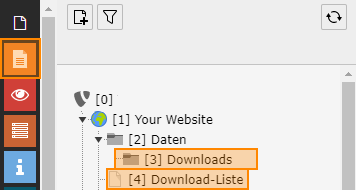
First switch to the list module.
-
Create a data container (folder) for the download records.
-
Below your root page, create a new hidden page for displaying the downloads. Create a normal page and in the page properties under Zugriff (Access) enable the option In Menüs Verbergen (Hide in menus). Add a plugin of type "Double-Optin-Download - Download List" to this page.